
Productised supports both inbound and outbound webhooks, meaning data transfer both to and from our platform is possible.
What are webhooks and how do they function?
Webhooks are a great way for systems to communicate with each other. Since their emergence in 2007, webhooks have become an incredibly popular software architecture approach that is used by some of the world’s most commonly used software solutions, such as Jira, Microsoft Teams, Discord, GitHub, or Slack for collaboration and communication, Stripe for payment gateways, or even Shopify for e-commerce.
Webhooks’ popularity in systems as diverse as Discord and Shopify demonstrates just how useful they are. Software developers like using webhooks because of their ease of implementation, ability to post information in real-time, and clear-cut purpose to enable lightweight communication between systems. So, let’s take a closer look at what webhooks are and how they are used.
What is a Webhook?
Webhooks are a simple way to post messages, in JSON format, from one application to another. They are used to submit a web-based notification whenever a specific event occurs, and have become an industry standard for enabling different pieces of software to communicate with each other in real-time.
To illustrate this point, here is a simple webhook example.
Here’s the scenario: let’s say your sales team is using Slack to collaborate. They also use a custom-built form to gather new leads. The sales team wants to receive a notification in Slack every time a new lead submits the lead generation form.
This is where webhooks come in: by using a webhook, a developer can create a simple “If This, Then That” (IFTTT) logic flow: if a new prospect submits the lead generation form, then the sales team should receive a notification. By using Slack’s incoming webhooks, developers can post a message with all the details from the lead generation form to the sales team’s Slack channel.
Every webhook has an associated URL, which serves as an HTTPS endpoint that accepts JSON payloads. The notification payloads are delivered to this URL using an HTTP POST request.
Webhook vs API: How is a Webhook Different From An API?
Webhooks and APIs enable communication between software systems. But webhooks and APIs are not the same.
The two differences between webhooks and APIs are that webhooks serve a single purpose, whereas APIs can serve multiple purposes, and webhooks automatically send data, whereas APIs need to be manually asked to get or modify data.
Upon the occurrence of an event, a webhook will automatically post a real-time message from one system to another.
Webhooks send the notification using HTTP POST requests. A webhook can only send information. It’s a one-way street where the “traffic” (the payload or the notification) will always and automatically flow from one system to another.
A RESTful API, on the other hand, can be used for other HTTP methods as well, such as get, post, put, patch, and delete. But unlike a webhook, which is driven by events, APIs use requests and responses to enable two-way communication between systems.
Here’s a summary of webhook vs API and how they are different:
Some people refer to webhooks as a reverse API, because the communication between two systems is initiated by the system sending the data rather than the one receiving it.
What Are Incoming and Outgoing Webhooks?
Incoming and outgoing webhooks are used to send messages to or from one system to another system.
An incoming webhook is used to post messages from an external system to another system. The system receiving the payload provides the associated webhook URL, which can accept the JSON payload and receives the POST request. A good example of an incoming webhook is Microsoft Team’s incoming webhook. By using the incoming webhook, developers can post messages from applications to Microsoft Teams.
An outgoing webhook is used to send messages from one system to another. Let’s stay with the Microsoft Teams’ example. By using the outgoing webhook, developers can send messages from a Microsoft Teams’ channel to an external web service. A popular implementation of an outgoing webhook is tagging a user or a channel through an “@mention”. By associating the “@mention” with a callback URL, messages will be posted to the callback URL every time someone uses “@mention”.
Where to find your inbound webhook URL
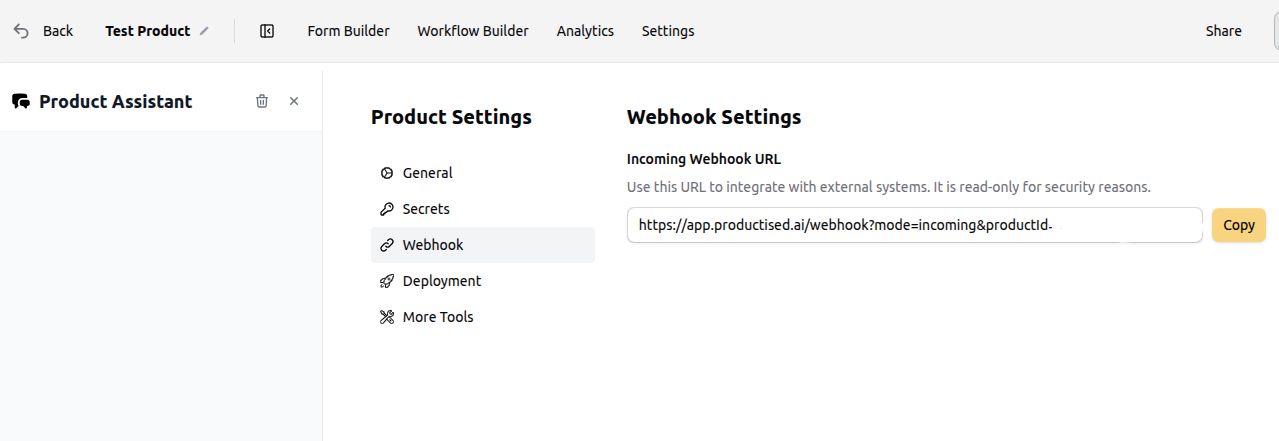
Webhooks are configurable for each product you create in the system. In your product, navigate to the 'settings' tab and then select 'webhook' from the menu. Here you will find the INBOUND webhook URL that enables you to receive a payload from external systems. You may wish to use this feature to receive data into Productised.
How to use Webhooks in Productised (Inbound and Outbound)
Our platform also supports the use of outbound webhooks, which can be valuable for parsing data such as form submissions to an external source. To use webhooks of either type you need to use the Actions Node in the workflow builder.
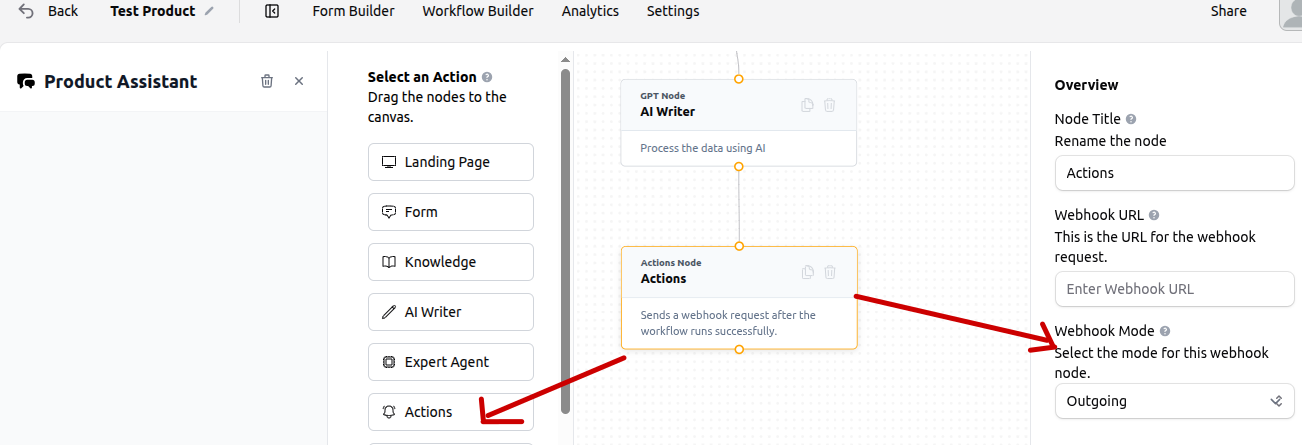
Drop the Action Node onto the workflow canvas and then select the webhook type (incoming/outgoing). For an inbound webhook, paste the URL from 'webhook' under product deployment settings into the 'enter webhook URL' box. For an outbound webhook you will need to paste the webhook URL from your external data provider in here.
*Please note the Action node should be run as the last node in the workflow sequence, as the data transfer should take place after workflow execution