About Input Masking
Input masking is a technique used to help respondents enter information into a form in a specific way. Imagine you need to ask your respondents for their phone numbers. Instead of just typing in their number freely as a bunch of unordered digits, respondents receive clear guidelines on how to enter it in a certain format, such as +1 (123) 456-7890.
Input masking can be really helpful in reducing errors and ensuring that the form data you receive is consistent and easy to process.
Mask Types
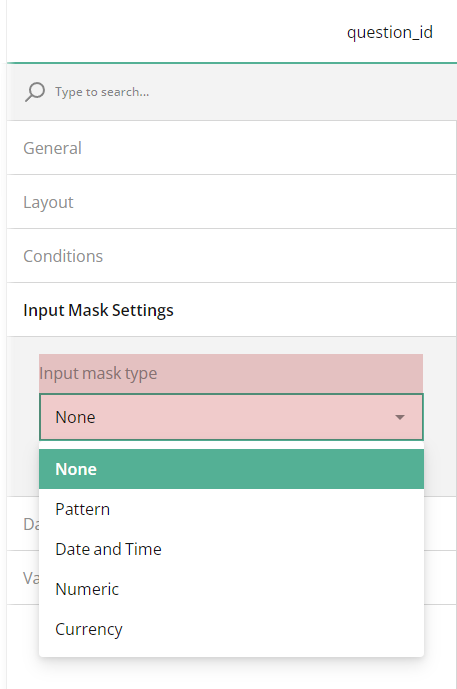
Input masks serve as templates that show respondents exactly how to enter their information, making sure input fields only accept data in certain predefined formats. In the Productised Form Builder, the following input mask types are available:
Pattern
Allows you to define a custom pattern using characters and symbols, ensuring that respondents enter data according to your specified format. For example, you can create a pattern for credit card numbers, such as 1234 4567 7891 1234.Date and Time
Guides respondents to enter dates and times in a specific format, such as mm/dd/yyyy for dates and HH:MM for times. This helps ensure consistency and accuracy in date and time entries.Numeric
Restricts input to numerical values only, allowing respondents to enter numbers without any additional characters. This is useful for collecting data like age, quantity, or measurements.Currency
Formats input fields to accept currency values. This mask type allows symbols, such as commas separating thousands or dollar signs to represent monetary amounts, helping respondents enter monetary values consistently and accurately.
How to Apply
Single-Line Input
To mask an entry of a Single-Line Input question, follow the steps below:
- Select a Single-Line Input question to which you wish to apply an input mask.
- Under General, locate the Input type property and make sure it's set to its default Text.
- Under Input Mask Settings, locate the Input mask type property.
- In the drop-down menu, select among the available mask types.